
Last Updated on September 15, 2026
You can view preliminary student-level results from the Passage Based Writing Field Test and export them in PDF (portable document format) or CSV (comma-separated values) format.
- From the My Applications menu, select Report Delivery then click the View Online Results tab.
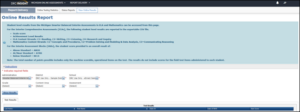
- Select the current Passage Based Writing Field Test administration, district, school, grade, content area, and assessment (all required) from the drop-down menus and click Show Results.
- The preliminary results (the PBW score 0-4) display in the Test Results tab at the bottom of the page. The tester’s last name, first name, state ID, date of birth, and raw score display as the column headers. To export the results to a PDF file, click Export to PDF. To export the results to a CSV file, click Export to CSV. Note: For the CSV file export, a dialog appears that you can use to save the file.