
Last Updated on June 22, 2026
Introduction to Central Office Services (COS)
Central Office Services (COS) is the system used to configure, manage, and support DRC INSIGHT software during online testing. COS provides a centralized way to define how Testing Devices, COS Service Devices (COS‑SDs), and testing content work together during a test session. At a high level, COS allows you to:- Organize Testing Devices and COS‑SDs into logical COS Configurations
- Control where test content is delivered from during testing
- Manage testing services and settings from a central location
Visual Overview of COS
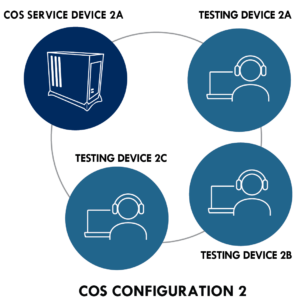
The diagrams below provide a visual summary of how COS components work together within a COS Configuration. They illustrate the relationship between COS Configurations, COS‑SDs, and Testing Devices. Each diagram represents a simplified example of a COS Configuration in which a single COS Service Device provides test content to multiple Testing Devices. The sections below describe each COS component in detail and explain how moving a device between configurations changes where test content is delivered during testing.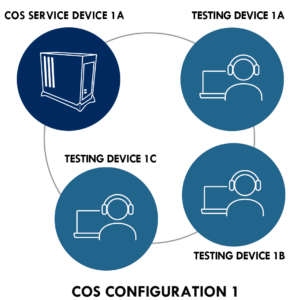
COS Configurations
A COS Configuration has two primary functions:- It allows you to logically group Testing Devices and COS – SDs.
- It allows you to easily specify the settings for all the devices in the COS Configuration.
COS Service Devices
The COS – SDs provide the test content and test hosting services for the COS Configuration if those services are enabled by the COS Configuration. Once a COS – SD is registered with a COS Configuration, it cannot be used in another COS Configuration, although you can remove the COS – SD from a COS Configuration and add it to another COS Configuration. If there are multiple COS – SDs in the COS Configuration, the device becomes part of the pool of COS – SDs associated with the COS Configuration.Testing Devices
For a student to test using DRC INSIGHT on a Testing Device, the Testing Device must be registered to a COS Configuration, and it cannot be used in another COS Configuration without moving the device. After a Testing Device is registered with a COS Configuration, the device becomes part of the pool of Testing Devices associated with that COS Configuration. Registering a Testing Device to a COS Configuration defines where the Testing Device’s test content will come from during testing. In the diagram above, moving a Testing Device from COS CONFIGURATION 1 to COS CONFIGURATION 2 causes the device to receive test content from COS SERVICE DEVICE 2A. Moving a Testing Device from COS CONFIGURATION 2 to COS CONFIGURATION 1 causes the device to receive test content from COS SERVICE DEVICE 1A.COS Configuration Options
Within a COS Configuration, you can manage Testing Devices, determine which DRC test programs will be available to the COS Configuration, add an optional proxy host for indirect testing, and establish other settings.COS Testing with or without a COS Service Device
The following diagram provides a visual overview of the process of testing with COS, with and without a COS – SD configured for Content Management and Content Hosting. Note: DRC strongly recommends the use of a COS – SD for test security and improved performance.Test Content, Test Engine Software, and Test Responses
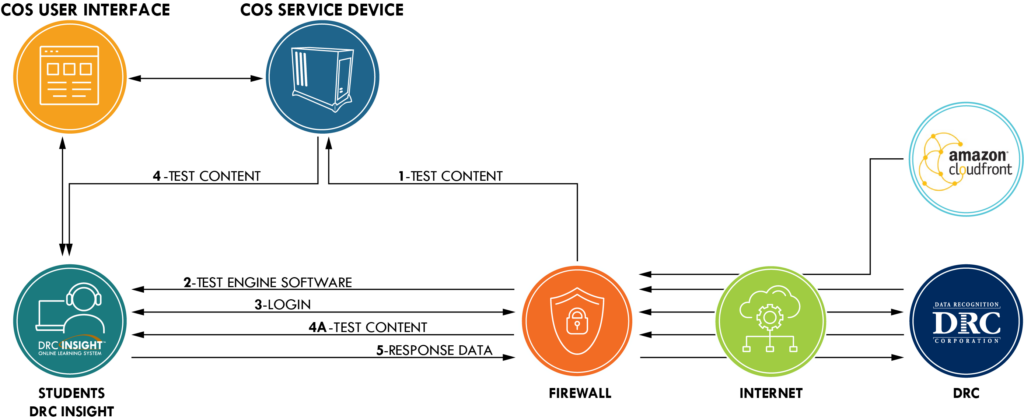
- Test Content – This path represents the initial path for test content with a COS – SD configured to use Content Management and Content Hosting. When the COS – SD is installed, test content stored on the Amazon Web Services (AWS) CloudFront is automatically sent to the COS – SD. The Content Management service automatically checks for new content overnight and updates the COS – SD.
- Test Engine Software – When a student starts DRC INSIGHT (i.e., the DRC INSIGHT Secure Application is launched), the test engine software is automatically loaded from the DRC servers to the Testing Device.
- Login – When a student logs in to the test, the student’s login is verified by the DRC servers and the student’s scheduled registrations are sent to the Testing Device.
- Test Content – When a student selects a test and a COS – SD is configured, the COS – SD delivers the test content to the student’s Testing Device, reducing the start-up time for the student. All of the test content is encrypted for security.
- Test Content – When a student selects a test in situations in which no COS – SD is configured (e.g., for tests with no accommodations), the test content is delivered directly from the DRC servers to the Testing Devices. Again, all the test content is encrypted for security.
- Response Data – The Response Data path represents the path for test response data. During testing, if the Testing Devices can communicate with the DRC server, the test responses go directly to the DRC server. If the Testing Devices cannot communicate with DRC, testing ends.